Chapter 3 - Video Terminals
As computer hardware developed and we were able to have things like vacuum tube displays (CRTs and the like), a device was invented called the video terminal.
The video terminal is a device like the teletype, but instead of printing to a literal sheet of paper it takes the characters sent to it and "print"s them onto a screen.
Serial video terminals like DEC's VT100 were incredibly popular. They looked like this:
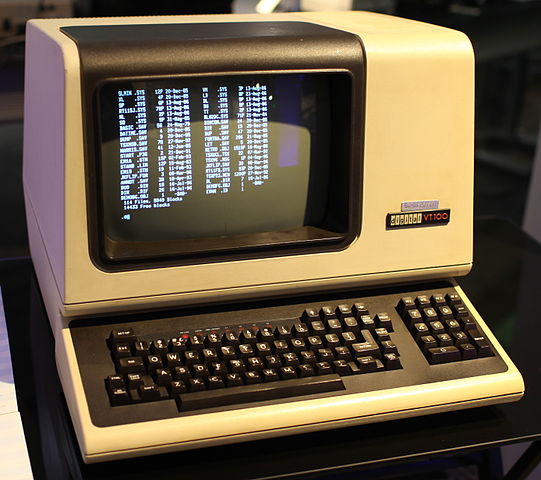
DEC VT100 terminal at the Living Computer Museum - Jason Scott (CC-BY-2.0, via Wikimedia )

It was the introduction of these video terminals, especially serial video terminals, that started to move computers away from paper. It saved a lot of paper and typewriter ribbon.
Computers were gigantic, and massively expensive. Mainframe computing was the popular choice because it literally was not possible to have a computer at every person's desk. Instead, one mainframe computer would have an entire room dedicated to it and it would have several of these serial terminals sprinkled around the office. They were the original chromebooks/"thin clients" -- can't do anything on their own, but hook them into the mainframe and you had everything at your fingertips. You just had to run the serial cables around the place.
These days, instead of using video terminals we use terminal emulators. They serve the same function but instead of being implemented in hardware, the terminal is implemented entirely as a software program. The standard terminal emulator xterm allows someone on a Unix or Unix-like system running the X Window System to access an emulated hardware video terminal from their fancy graphical computer. At the start xterm emulated the VT102, but as video terminal hardware implemented new features they were also implemented in xterm.