Chapter 11 - OSI Layer 4: Transport
So, my binary example showed a cut-down version of Internet Protocol's User Datagram Protocol. Where a Telegraph allows you to use Morse code to send Telegrams, Internet Protocol allows you to use UDP to send Datagrams. Basically, any data you want as long as it fits into a single packet, which are normally limited to about a kilobyte in size
The 4th layer of the OSI model, Transport, is implemented by the Internet Protocol's TCP protocol. Together, that is referred to as the TCP/IP networking model. TCP is like UDP, but it adds some additional rules:
Messages relate to each other, to form a single ongoing stream of data.
Messages must be processed in a specific order without any missing parts. TCP packets include a sequence number that allows the receiver to make sure they get ordered correctly.
After a message is sent, the receiving machine must send a message back called an acknowledgement (ACK)
If an ACK is not received for one sent message, that message must be re-sent until the ACK is received
By this set of rules, instead of sending simple size-limited datagrams computers can use Internet Protocol to have an ongoing conversation of arbitrary length
I'm not going to go into how TCP formats its packets because if I'm being honest it's painfully boring information that we can gloss over without really impacting the takeaway
The point here is that TCP/IP takes an Internet connection, and allows you to have an ongoing conversation more or less exactly like a serial connection would. You can send some bits over, and the computer at the other end can send some bits back
This is what birthed telnet, the remote access utility which allowed you to access a computer's terminal over the Internet.
Where a Teletype machine would connect over Serial to send individual characters to a computer's TTY interface, telnet connects over TCP/IP to send individual characters (or groups of characters in order) to connect to a computer's virtual TTY interface.
The implementation of telnet directly addresses ARPA's concern:
Rather, the ARPANET came out of our frustration that there were only a limited number of large, powerful research computers in the country, and that many research investigators, who should have access to them, were geographically separated from them.
When you had to use a telephone modem to dial directly into a research computer's Serial TTY, that phone line and serial port were tied up for your exclusive use. Nobody else could use that connection while you were on the line. Anyone trying to would just get a telephone busy signal.
With telnet though, because it operates over networks where switching happens per-packet instead of per-connection, the research computer can have one link into the network but then serve dozens of connections over that link. Each connection going to its own Virtual TTY.
When you take your TCP connection and use telnet to get a virtual TTY on a remote computer, that connection makes up a session. The 5th layer of the OSI model.
Your terminal emulator which is hosting the telnet session generally handles the 6th layer Presentation, taking the bytes that go across the session and rendering them onto a virtual teleprint video terminal.
And then whatever application is running over that telnet session makes up the 7th layer, Application. For example, sh or bash.
Objectively, the best application to use over telnet was the one hosted at towel.blinkenlights.nl: https://fossbytes.com/watch-star-wars-command-prompt-via-telnet/
Going back to this, it's time for some Internet trivia 
Although you can't physically see the routers along the way of this connection, you can virtually see them. The Ping protocol, which is IP protocol 0x01 "ICMP" (as opposed to UDP 0x11 and TCP 0x06), has a feature where your packet specifies "I'm measuring round-trip time but I want the Nth router in the connection to respond instead of the actual destination device"
By pinging and incrementing that "N" value one by one until you reach the actual destination, you can reconstruct the entire path.
This technique is called "trace route", and is implemented on Windows by the tracert tool. On Linux, the most popular tool is mtr "My Trace Route"
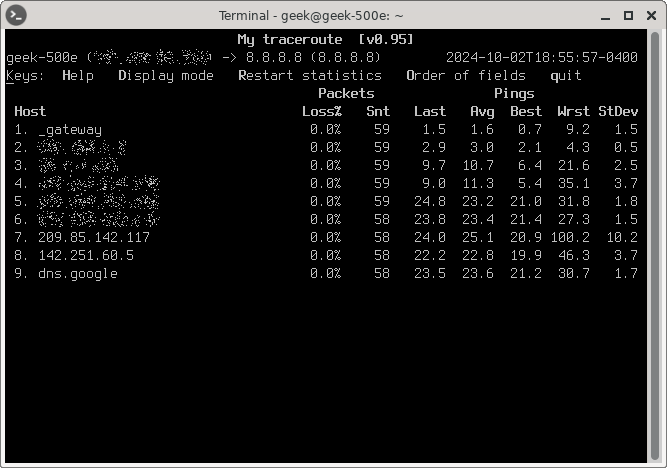
E.g., from where I am right now there are 8 routers between me and IP Address 8.8.8.8 (shown here as name dns.google)
You can see the "Avg" time listed for each router gets progressively longer the further down the list you go. Some intermediate connections will report shorter/longer times depending on how quickly they want to respond to ping requests, but it generally trends upwards
In this sample traceroute I sent, we can guess that the first 4 routers belong to my ISP, and then the next 4 routers belong to Google's ISP (which is just Google because they run their own ISP). You can see, the ping latency jumps up significantly between routers 4 and 5.
That's just a guess though. We could measure precisely by looking up who owns the IP address assigned to each of the routers, which is public information, but to be honest I can't be bothered right now.
Tomorrow we can talk about the few remaining technologies that led to the World Wide Web, and eventually VPNs